Author: Devika R
July 15, 2026
8 min read
A finished Revit model is not a finished BIM deliverable. Before any model reaches a client, professional teams run QA/QC audits, coordination checks, and documentation reviews. This hidden work decides whether a submission moves forward smoothly or comes back with revisions.
A BIM model may look complete in Revit, but professional BIM teams know that modeling is only one part of project delivery.
Before any model reaches a client, it goes through a series of quality checks, coordination reviews, documentation validation, and internal approvals. These steps are rarely visible to students. However, they play a major role in deciding whether a project moves forward smoothly — or comes back with revisions.
This is the side of BIM that most people only discover after they start working on a live project.

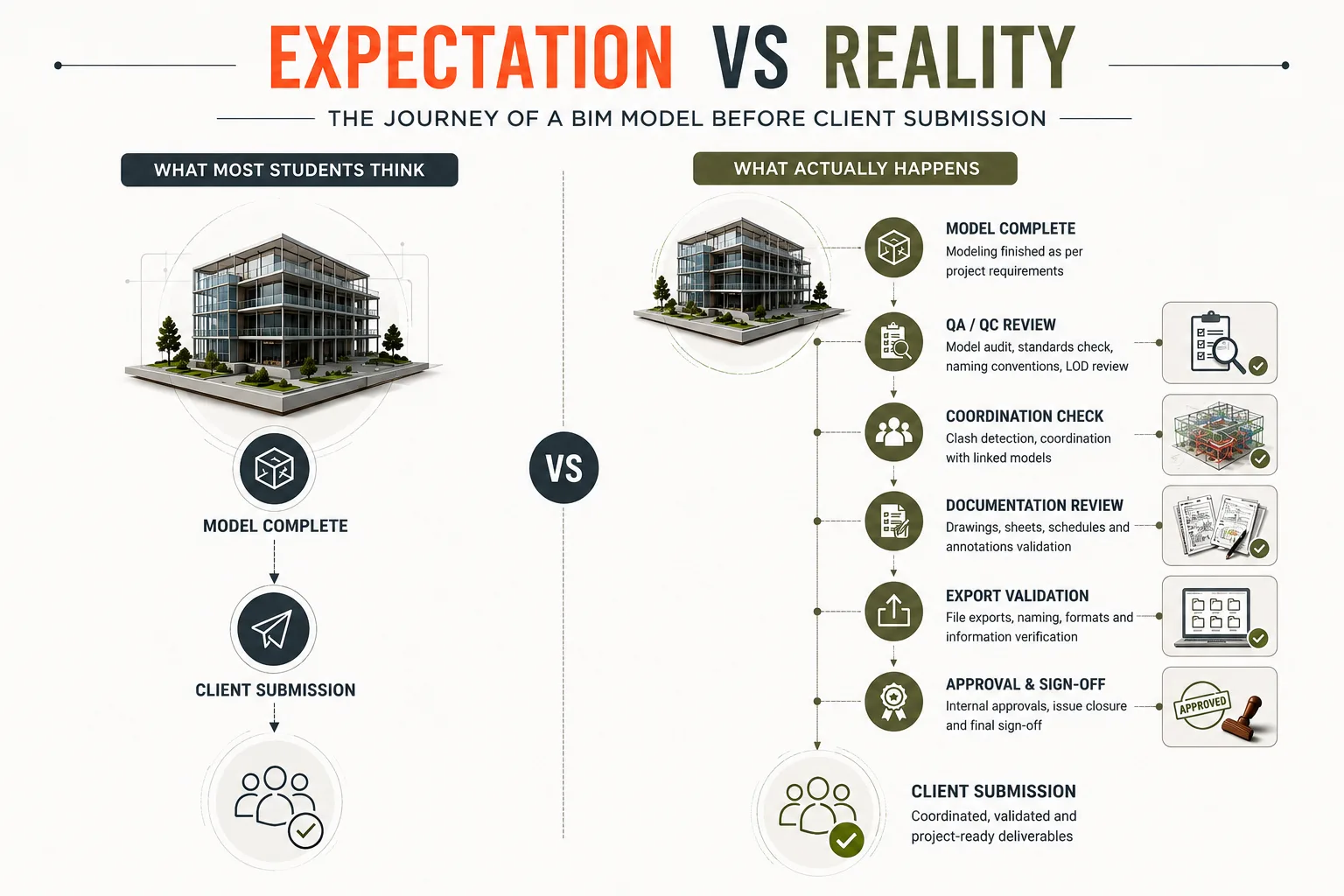
1. What Most Students Think
Most beginners picture a very short journey for their model. Once the modeling ends, they expect the file to go straight to the client.
- Model Complete
- Client Submission
2. What Actually Happens
In real projects, the path is much longer. Each stage below filters out problems before the client ever sees the model.
- Model Complete
- QA/QC Review
- Model Cleanup
- Coordination Check
- Documentation Review
- Export Validation
- Client Submission
3. A Good-Looking Model Isn’t Always a Good BIM Model
One of the biggest misconceptions among beginners is believing that a visually clean Revit model is automatically ready for delivery. In reality, BIM teams review much more than appearance.
They check whether the model is:
- Coordinated across disciplines — architecture, structure, and MEP work together without clashes.
- Following BIM standards — templates, views, and workflows match the project’s BIM execution plan.
- Correctly positioned using shared coordinates — every linked discipline lands in the right place.
- Structured for documentation and schedules — families and parameters support sheets and quantities.
- Ready for construction workflows — the model can actually be built from, not just looked at.
In other words, a model can look perfect and still create serious problems during coordination.
4. The Checks Clients Never See
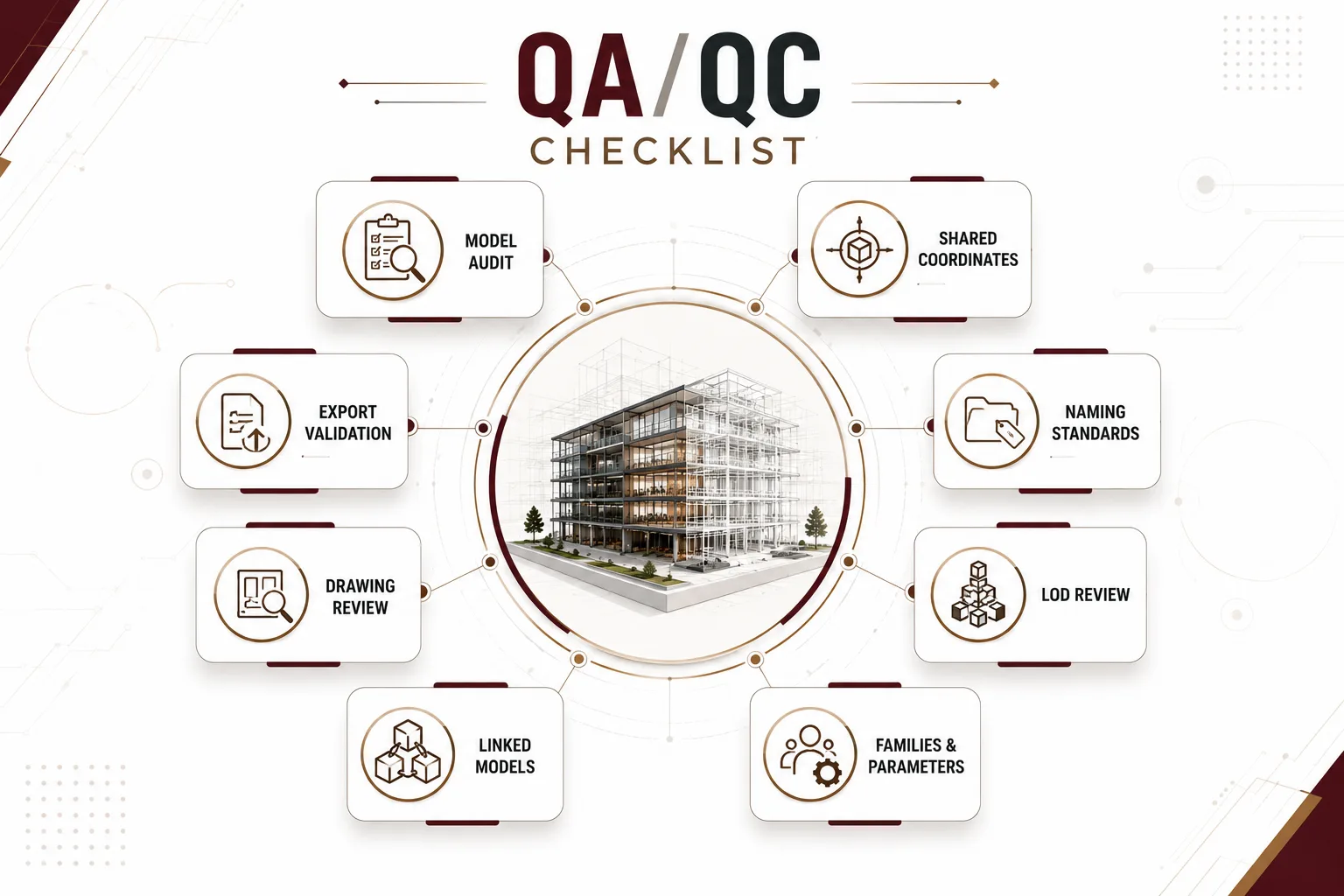
Before submission, BIM teams typically review:
| Behind-the-Scenes Check | Why It Matters |
|---|---|
| ✓Model Audit | Improves model health and performance |
| ✓Shared Coordinates | Ensures all disciplines align correctly |
| ✓Naming Standards | Keeps teams working consistently |
| ✓LOD Review | Confirms the required level of detail |
| ✓Family & Parameters | Supports schedules and documentation |
| ✓Linked Models | Prevents coordination issues |
| ✓Drawing Review | Ensures documentation matches the model |
| ✓Export Validation | Verifies files before client delivery |
Clients rarely notice a well-prepared BIM model. They usually notice the model only when something goes wrong. That’s why professional BIM teams spend significant time reviewing models before submission.
5. Why QA/QC Matters More Than Speed
Students often focus on learning faster Revit commands. In real projects, however, speed alone doesn’t guarantee quality.
A BIM engineer who spends an extra 30 minutes checking coordinates, model standards, and documentation can prevent hours — or even days — of coordination issues later.
As a result, professional firms value reliable submissions far more than fast submissions.
6. BIM Is More Than Modeling
A BIM submission is much more than sending an RVT file. It usually includes:
- Coordinated models
- Drawing sheets
- Schedules
- Clash updates
- Documentation packages
- Exported deliverables
- Revision records

Every deliverable must align with the project requirements before it reaches the client.
7. What This Means for Your BIM Career
One lesson surprises many fresh BIM engineers: companies don’t promote professionals simply because they model quickly.
Instead, they value people who understand:
- BIM QA/QC
- Documentation standards
- Coordination workflows
- Information management
- Project delivery
These skills build trust — and trust is what clients remember.

Learning Revit is an important first step, but delivering a project-ready BIM model requires much more than software knowledge. Understanding QA/QC, BIM standards, coordination, and documentation helps bridge the gap between classroom learning and real project delivery.
Ultimately, these are the practical workflows that transform a model into a professional BIM submission.
Final Thoughts
Anyone can finish a Revit model. The real question is:
Is the model ready to leave the office?
Behind every successful BIM submission is a process of checking, reviewing, coordinating, and validating information.
It’s a part of BIM that clients rarely see — yet it’s one of the biggest reasons successful projects stay coordinated from design to construction.
Professional BIM Course
Master BIM Course
Structural Design Concepts and BIM
Certified MEPF BIM Master Course
Electrical BIM Professional Program
RenderLab – Master 3D Modeling & Photorealistic Rendering
Multi-Tool Mastery for Architects & Engineers
BIM Coordinator Workflow Program
BIM FastTrack – 30 Day Intensive Training
Global Architectural & Structural BIM Project Program