Author: Devika R
April 17, 2026
7 min read
AI is everywhere right now. From design tools to automation, every industry is evolving—and construction is no different. Naturally, this has led to one big question among students and professionals: “Will AI replace BIM engineers?”
At BIM Cafe Learning Hub, we hear this quite often—especially from freshers and engineers planning to switch careers.

What AI Actually Does in BIM (In Real Terms)
AI is already being integrated into tools like Autodesk Revit and other BIM platforms. In practice, it helps teams move faster on repeatable work—similar to how Navisworks clash detection workflows compress coordination cycles when paired with disciplined model standards.
Instead of replacing engineers, AI mainly helps with:
- Automating repetitive tasks
- Suggesting design alternatives
- Running faster clash detection
- Checking basic compliance
- Analyzing large project data
For example, AI can suggest duct routing, optimize layouts, and flag potential issues. Sounds powerful—but that’s only part of the story.
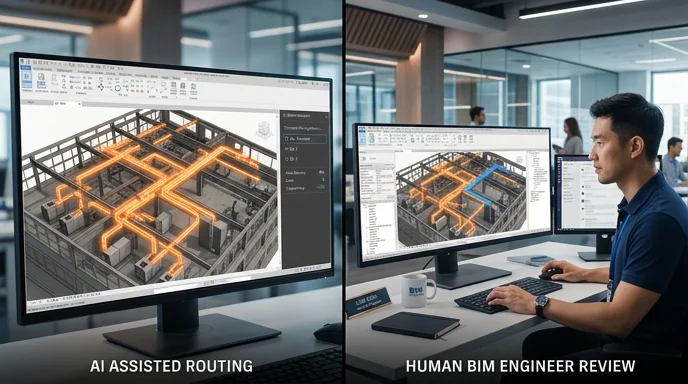
AI doesn’t fully understand site conditions, practical installation challenges, real coordination issues, or on-site constraints. For example, AI might suggest a duct path—but will it know if there’s enough clearance, if it’s installable, or if it conflicts with site execution? That decision still depends on a BIM engineer.
What BIM Engineers Actually Do
In real projects, BIM engineers are not just modelers. They are responsible for:
- Coordinating architectural, structural, and MEP models
- Identifying and resolving clashes
- Managing BIM workflows
- Producing construction drawings
- Communicating with project teams
If you want a clearer idea of discipline roles, read What Do MEP Engineers Actually Do in BIM Projects? For the bigger delivery picture, see how a real BIM project works from design model to construction site.
These roles require experience, judgment, and coordination thinking—and that’s exactly where humans still lead.
How AI Will Change BIM Roles
AI won’t remove jobs—it will shift responsibilities.
- Earlier: more time spent on manual modeling
- Now and future: more focus on coordination, model validation, and decision-making
In simple terms: less drafting → more thinking. That shift is also why employers increasingly test what BIM recruiters look for in 2026 beyond “button clicking.”
Skills That Will Matter Going Forward
If you’re entering BIM today, focus on:
- Understanding workflows end-to-end
- Coordination skills
- Real project exposure
- Basic automation (Dynamo, scripting)
- Communication skills
This is also why many candidates struggle in interviews—see common reasons recruiters reject BIM CVs. Tools alone are not enough anymore. Strong fundamentals also show up when you learn Revit shortcuts and efficient modeling habits that keep models clean for coordination.
Future of BIM Careers (With AI)
AI will reduce repetitive drafting, but it will increase demand for BIM coordinators, BIM engineers, and workflow managers. Companies will look for people who can validate AI outputs, handle real project challenges, and manage coordination.
If you are comparing software responsibilities, our BIM software list for coordinators helps place Revit, Navisworks, and coordination tools in context. BIM is not shrinking—it’s evolving.
How BIM Cafe Prepares You for This Reality
At BIM Cafe Learning Hub, the approach is simple: not just teaching software, but preparing you for real project work. That includes project-based learning, coordination workflows, industry-level training, and interview preparation.
If you are early in your career, start with realistic expectations: read can a fresher really become a BIM coordinator? and map skills using our BIM career roadmap for 2026.
The industry doesn’t need “Revit operators”—it needs people who understand how projects actually work.
Relevant Courses for BIM & AEC Careers
- Professional BIM Course (civil + structural focus): structural modeling, rebar detailing, coordination workflows.
- Structural Design Concepts & BIM: structural fundamentals, design intent vs BIM modeling, engineering + BIM integration.
Final Thoughts
AI is not a threat to BIM engineers—it’s a tool. But like every tool, it depends on how you use it. Those who depend only on software will struggle; those who understand workflows will grow. Engineers who combine BIM + practical knowledge + evolving tech will lead the industry.
Frequently Asked Questions
Will AI replace BIM engineers?
No. It will assist, not replace.
What will change in BIM careers?
Less manual work, more coordination and decision-making.
Is BIM still a good career in 2026?
Yes. Demand is increasing globally.
What should I focus on to stay relevant?
Workflow understanding, coordination, and real project exposure.
Professional BIM Course
Master BIM Course
Structural Design Concepts and BIM
Certified MEPF BIM Master Course
Electrical BIM Professional Program
RenderLab – Master 3D Modeling & Photorealistic Rendering
Multi-Tool Mastery for Architects & Engineers
BIM Coordinator Workflow Program
BIM FastTrack – 30 Day Intensive Training
Global Architectural & Structural BIM Project Program