Author: Devika R
August 20, 2026
7 min read
A BIM Model Can Look Perfect and Still Be Wrong
Imagine opening a BIM model and seeing exactly what you expect.
The walls are modelled correctly.The equipment looks accurate.The views are clean.The sheets are well presented.
At first glance, everything seems fine.
But then someone asks:
“What information does this equipment contain?”
Suddenly, the problem becomes obvious.
The manufacturer isn't identified.The required parameters are missing.Naming is inconsistent.Classification isn't clear.Some elements contain useful data while others don't.
The model may look professional, but it isn't necessarily useful as project information.
That's one of the most important lessons in modern BIM:
BIM isn't just about what the model looks like. It's also about what the model knows.
BIM Is More Than 3D Geometry
One of the easiest ways to misunderstand BIM is to think of it as advanced 3D modelling.
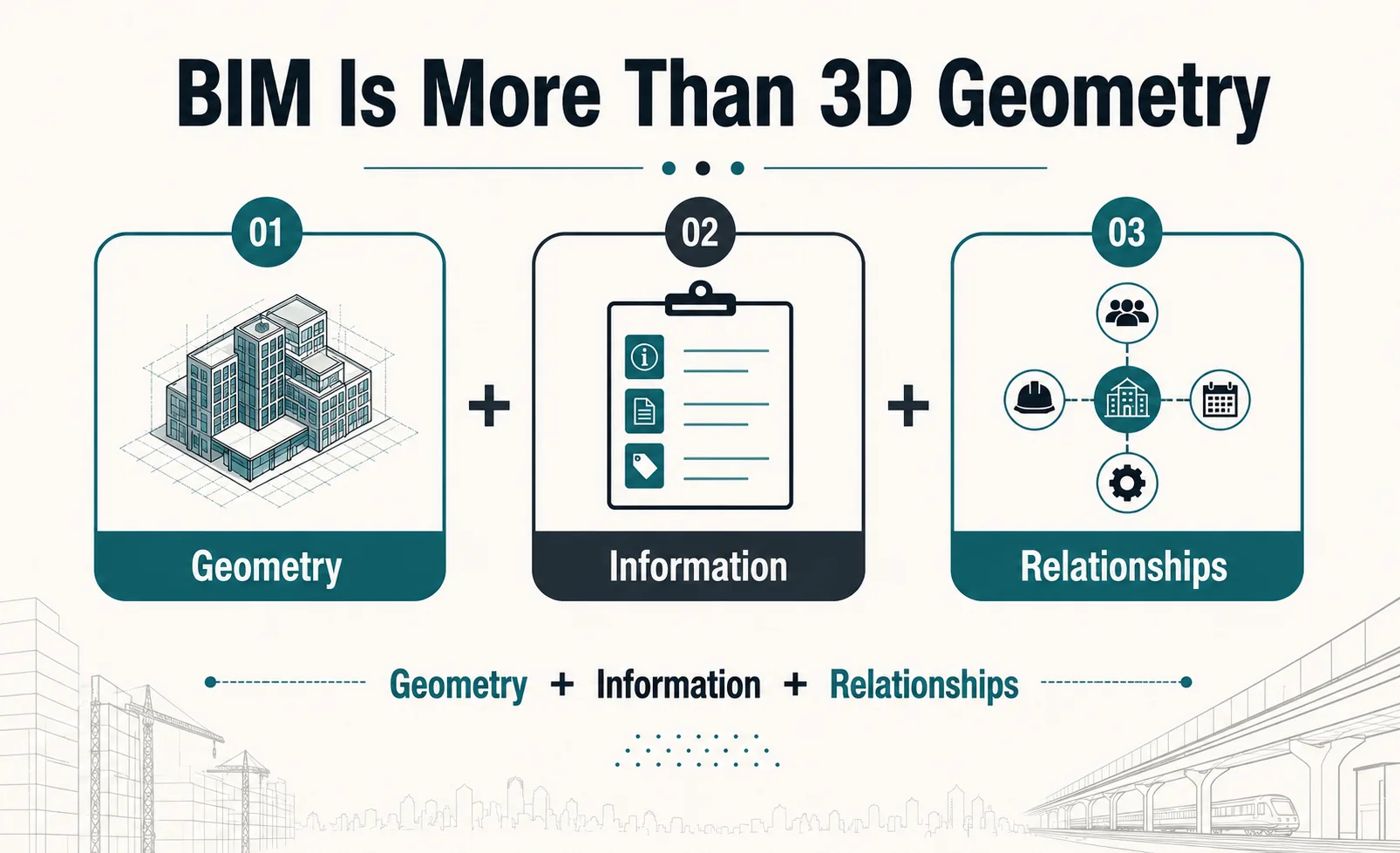
A BIM model contains much more than geometry.
Think of it as:
Geometry + Information + Relationships
Geometry tells you what something looks like and where it is.
Information can tell you what it is, what properties it has, and how it should be used.
Relationships help connect that element to the wider project.
For example, a door isn't simply a rectangular object in a model.
It may contain information relating to:
- Door type
- Dimensions
- Material
- Fire rating
- Manufacturer
- Classification
- Location
- Associated room or space
The more effectively this information is structured, the more useful the BIM model becomes beyond visual representation.
So, What Information Lives Inside a BIM Model?
Depending on the project stage and requirements, BIM elements can contain different types of information.
Geometric Information
Dimensions, location, shape, level, orientation, and spatial relationships.
Technical Information
Materials, performance characteristics, specifications, and system properties.
Identification Information
Element names, types, codes, classifications, and unique identifiers.
Project Information
Information required for documentation, quantities, procurement, construction, handover, or other project processes.
Asset Information
For relevant projects, information about equipment and assets can support later operation and maintenance.
This is why BIM data management matters.
The objective isn't to add information simply because it can be added.
The right information needs to be available to the right people at the right stage.
The Same Model Can Produce Two Very Different Results
Consider two BIM models representing the same building.
Both models may look almost identical during a quick visual review.
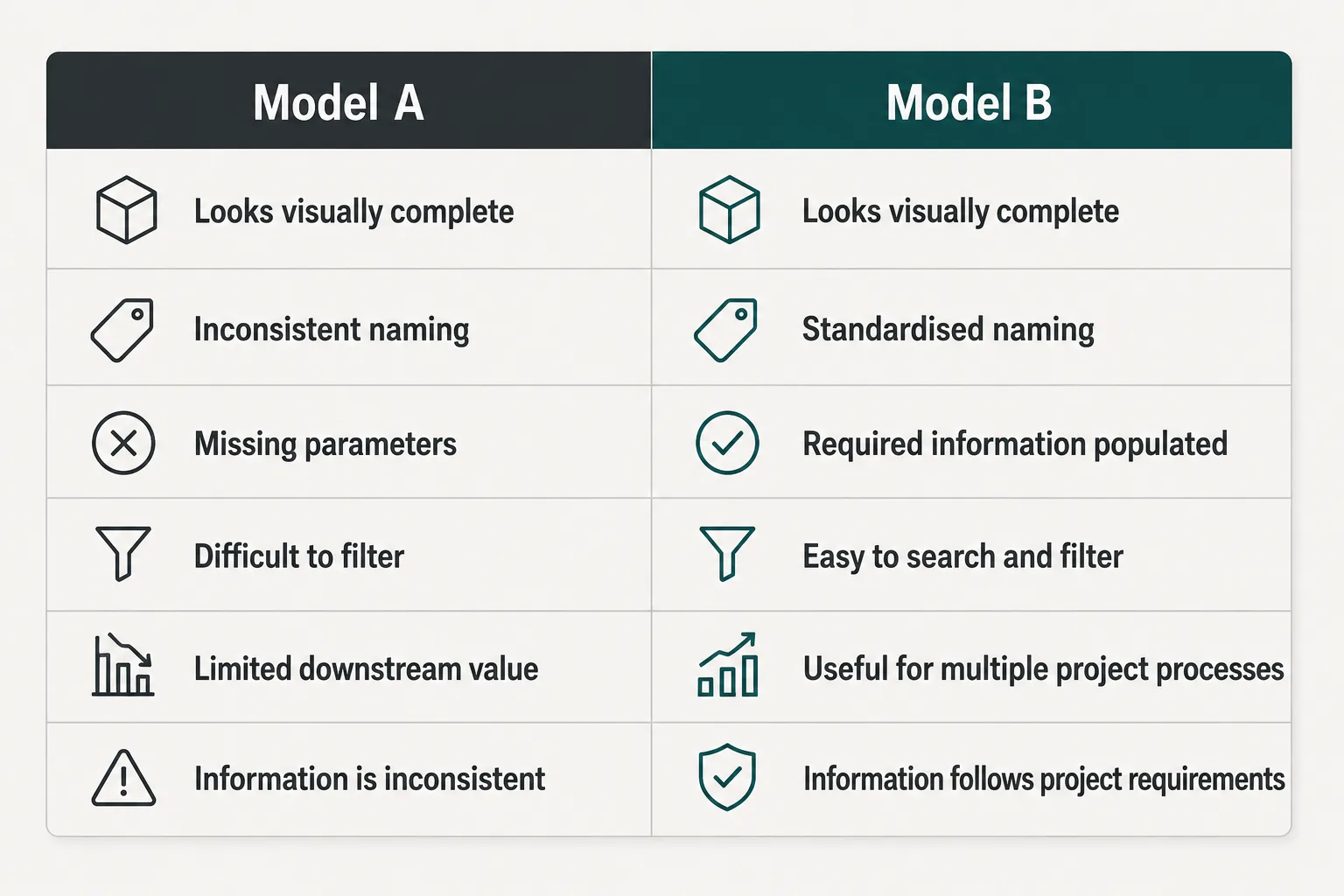
But their value to the project can be very different.
That's the hidden side of BIM.
Why Naming and Parameters Matter
This may sound like a small detail when you're learning Revit.
It isn't.
Imagine a large project containing hundreds or thousands of doors.
If they're named and structured consistently, project teams can quickly identify, filter, review, schedule, and manage them.
If every modeller uses a different naming approach, the same task becomes much harder.
The same principle applies to:
- Families
- Parameters
- Views
- Sheets
- Levels
- Grids
- Systems
- Model elements
- File structures
Good BIM workflows don't depend only on modelling accurately.
They depend on organising information consistently.
This Is Where BIM Standards Become Important
As projects become larger and more collaborative, everyone needs to understand how information should be created, named, exchanged, checked, and managed.
That's where BIM standards and project requirements become important.
Depending on the project, professionals may encounter:
- BIM Execution Plans (BEP)
- Employer's Information Requirements (EIR)
- Information requirements
- Naming conventions
- Classification systems
- Level of Information Need
- ISO 19650-based information management workflows
- Common Data Environments (CDE)
You don't need to memorise every standard to understand the principle.
The idea is simple:
A BIM project needs rules for managing information, not just rules for creating geometry.
The BIM Workflow Doesn't End When the Model Is Created
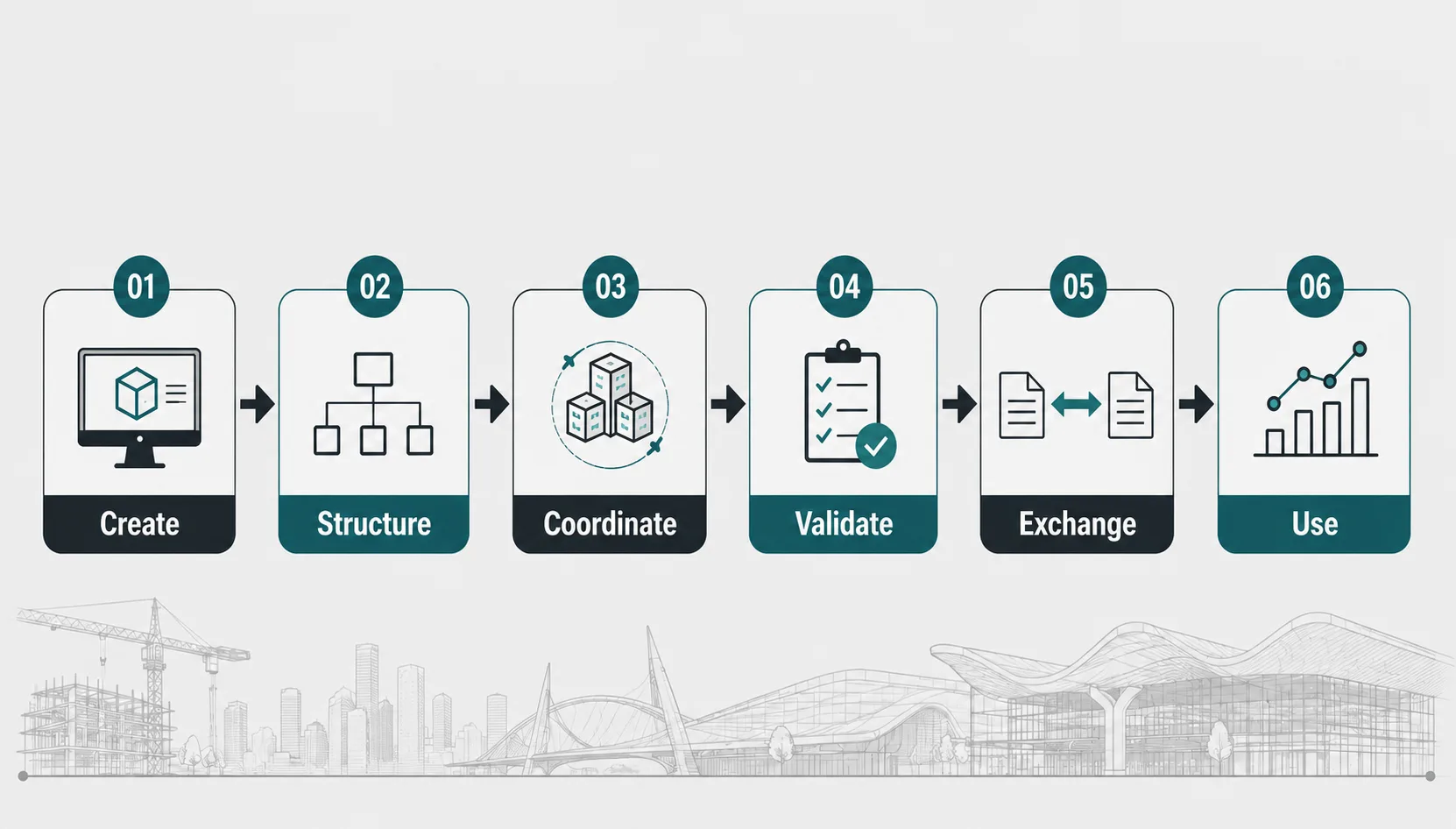
A useful BIM workflow is closer to:
Create
Develop the model and required project information.
Structure
Apply appropriate naming, parameters, classifications, and organisation.
Coordinate
Bring information together across disciplines and identify issues.
Validate
Check whether the model meets project requirements.
Exchange
Share the required information through appropriate project workflows.
Use
Apply the information to documentation, quantities, construction, handover, operations, or other project needs.
This is why BIM information management sits across the project lifecycle rather than belonging to one modelling stage.
What Happens When BIM Information Is Poor?
Poor information management can create problems that aren't immediately visible.
For example:
- Inconsistent data
- Difficult model checking
- Unreliable schedules or information extraction
- More manual work
- Higher risk of errors
The problem may not be a modelling mistake.
It may be an information management problem.
And as projects become more complex, those problems can become increasingly expensive to fix later.
BIM Data Doesn't Stop at Construction
This is another reason information matters.
The same project information may support different stages of the asset lifecycle.
Design
→ Coordination
→ Construction
→ Handover
→ Operations
→ Maintenance
→ Future Changes
At handover, for example, asset-related information may be required by the facilities team.
Later, when a building is renovated, existing digital information can help project teams understand what is already there.
This connects BIM information management with areas such as asset management, facility management, and digital twins.
Why This Matters for Future BIM Professionals
This is where students should look beyond software commands.
Knowing how to create a wall, pipe, duct, or structural element is useful.
But professional BIM work also requires you to understand:
- What information should the element contain?
- Who will use that information?
- How should it be named?
- What project standard applies?
- How will other disciplines interact with it?
- What happens to the information after modelling?
That's the difference between simply creating a model and understanding how BIM information supports a project.
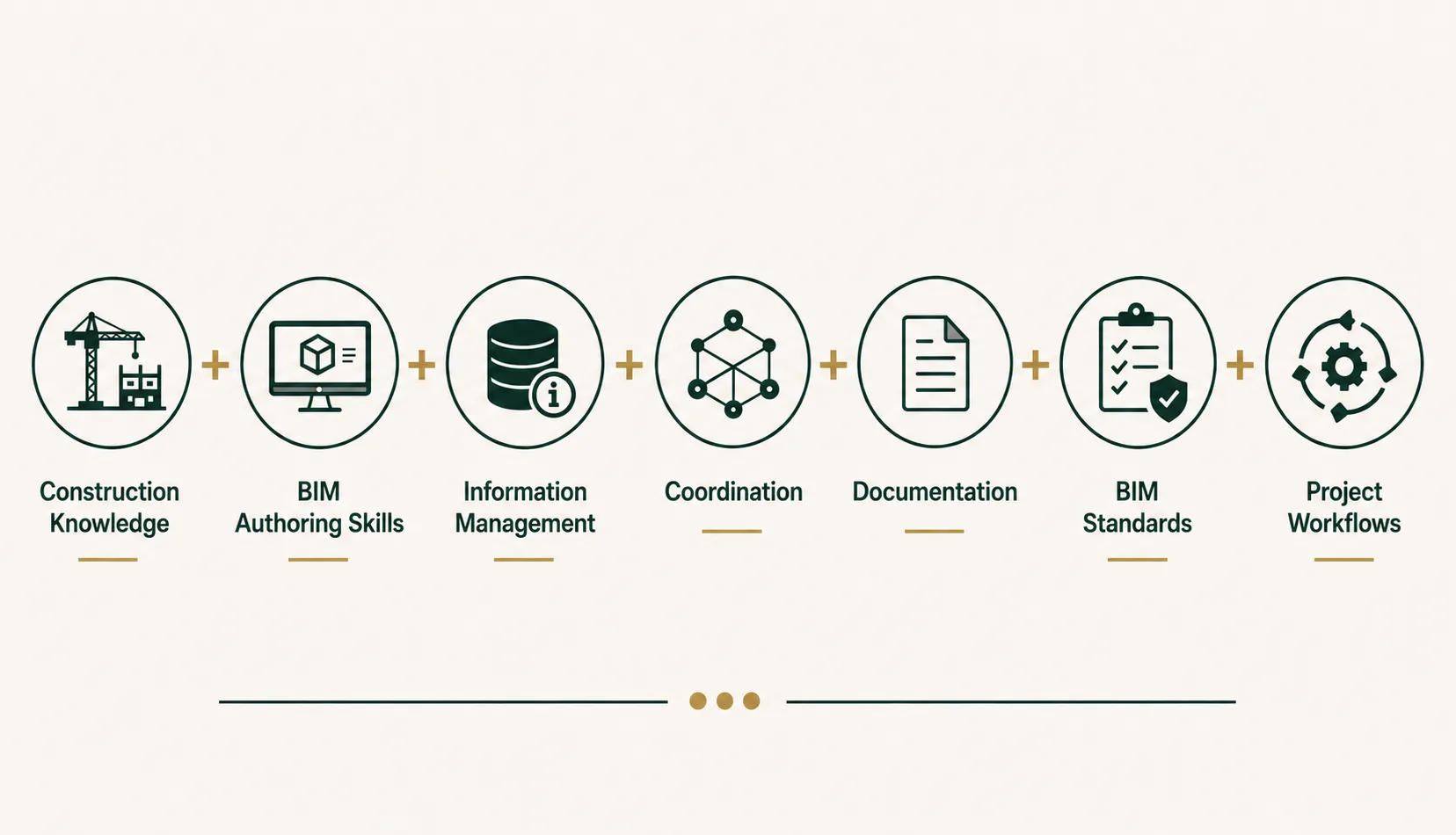
What Should You Learn Beyond Revit?
If you're preparing for a career in BIM, build your skills around more than software.
Understanding how information moves through a project is the bigger skill.
The Real Value of a BIM Model
A model shouldn't be judged only by how impressive it looks in a 3D view.
Ask instead:
Can the information be found?
Is it consistent?
Can the project team use it?
Does it meet the project's requirements?
Can that information support the next stage of the project?
If the answer is yes, the model becomes more than a digital representation of a building.
It becomes a usable information resource.
Final Thoughts
The future of BIM isn't simply about creating increasingly detailed models.
It's about creating better-connected information.
A BIM professional who understands geometry but ignores information can produce a visually impressive model that creates problems later.
A professional who understands modelling, information, standards, coordination, and project requirements can contribute much more effectively to digital project delivery.
So the next time you open a BIM model, don't only ask:
“Does it look right?”
Ask:
“Does the information work?”
Because in professional BIM, the value of a model isn't only what you can see—it's what you can use.
Frequently Asked Questions
What is BIM Information Management?
BIM Information Management is the process of organising, structuring, checking, sharing, and maintaining project information throughout the BIM lifecycle according to project requirements.
Why is BIM data important?
BIM data allows project teams to use models for more than visualisation. Structured information can support coordination, documentation, quantities, construction, handover, asset management, and other project processes.
Is BIM Information Management the same as Revit modelling?
No. Revit is a BIM authoring tool, while BIM Information Management covers the broader process of managing project information, standards, requirements, exchanges, and workflows.
What is ISO 19650 in BIM?
ISO 19650 is an international framework for managing information over the lifecycle of built assets using BIM principles. Its concepts are particularly relevant to structured information management and collaborative project delivery.
What should BIM students learn besides Revit?
Students should develop knowledge of construction workflows, BIM coordination, documentation, information management, BIM standards, project requirements, and multidisciplinary collaboration alongside software skills.
Can BIM information be used after construction?
Yes. Depending on project requirements, information from the BIM process can support handover, facility management, asset management, maintenance, renovation, and digital twin workflows.
Professional BIM Course
Master BIM Course
Structural Design Concepts and BIM
Certified MEPF BIM Master Course
Electrical BIM Professional Program
RenderLab – Master 3D Modeling & Photorealistic Rendering
Multi-Tool Mastery for Architects & Engineers
BIM Coordinator Workflow Program
BIM FastTrack – 30 Day Intensive Training
Global Architectural & Structural BIM Project Program