Author: Devika R
April 6, 2026
7 min read
Introduction: Where BIM actually begins
Most people think BIM starts inside Revit. It doesn’t. It starts much earlier—on-site, when data is captured. And this is exactly where confusion begins.
If you’ve come across terms like Total Station and LiDAR scanning, you’ve probably wondered: “Which one is used in BIM?” and “Do I need to learn both?” At BIM Cafe Learning Hub, we hear this often—especially from civil engineers and students entering BIM.
The simple answer? Both are used, but for very different reasons. Once you understand that difference, BIM workflows start to feel much clearer.
Field measurements and reality capture feed the models you build in software. Without trustworthy coordinates and as-built context, coordination breaks down long before the first clash report.
What a Total Station really does on site
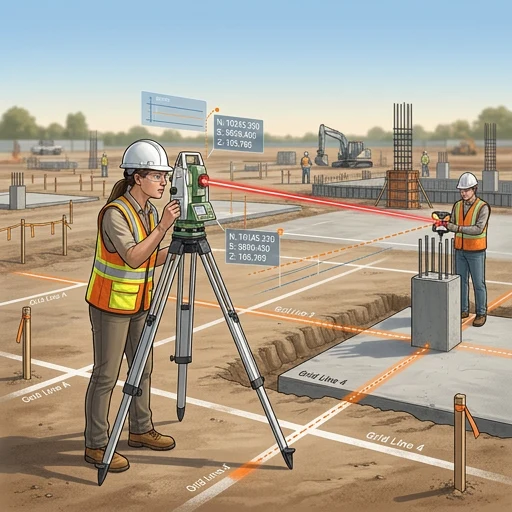
A Total Station is still one of the most trusted tools in surveying. In real project terms, you don’t scan everything—you choose exactly what to measure. That selectivity is what makes it powerful.
You’ll typically see it used for:
- Setting out columns and foundations
- Marking grid lines
- Establishing control points
- Road alignment and layout
It’s precise, controlled, and extremely reliable. It is also slower in the field, because work is measured point by point.
What LiDAR scanning actually changes
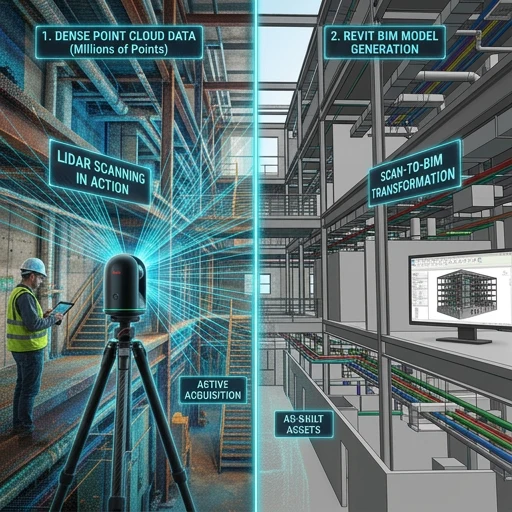
LiDAR works in a completely different way. Instead of selecting individual points, it captures a very dense swath of everything in front of it—walls, ceilings, pipes, beams, and more.
What you get is a point cloud: a dense 3D representation of existing conditions. In real projects, LiDAR is used for:
- Existing building documentation
- Renovation and retrofit work
- Complex structures
- Scan-to-BIM workflows
If Total Station is selective, LiDAR is comprehensive.
Total Station vs LiDAR: The practical difference
Instead of asking “which is better,” professionals ask what the job requires. Here is a concise comparison:
| Feature | Total Station | LiDAR scanning |
|---|---|---|
| Data type | Selected points | Millions of points (point cloud) |
| Speed | Slower (manual) | Very fast (automated) |
| Accuracy | Extremely high (point accuracy) | High (surface / volume accuracy) |
| Workflow | Manual targeting | Automated scanning |
| Output | Coordinates | 3D environment |
| Best use | Layout and control points | As-built and BIM modeling from reality |
| Human effort | High | Lower (after setup) |
So it’s not about which technology “wins.” It’s about scope, accuracy requirements, and deliverables on your project.
How both are used in BIM projects
In real-world projects, you’ll rarely see one replacing the other. They are used together.
- Total Station → Control points and layout accuracy
- LiDAR → Capturing full site or as-built conditions
The LiDAR scan becomes a point cloud, which is then used for modeling in Revit and coordination in tools like Navisworks. For a step-by-step view of the journey from scan to model, read The Real Scan-to-BIM Process: What Most People Don’t See.
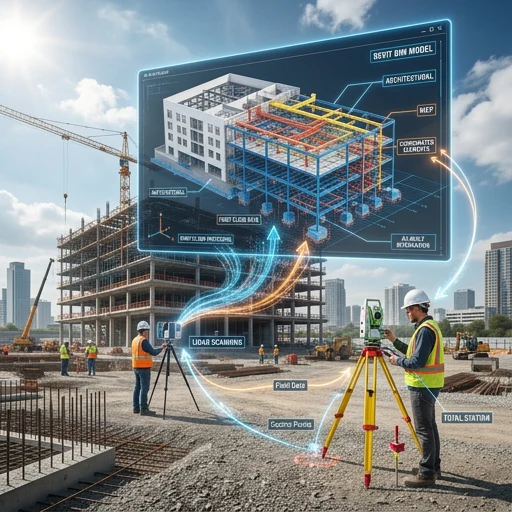
Once you understand this, one thing becomes clear: BIM is not just modeling—it’s working with real data.
Why this matters more than you think
Many students focus only on tools—Revit, Navisworks, AutoCAD. In real projects, employers expect you to understand where model data comes from, how accurate it is, and how that affects coordination.
That gap is why candidates struggle in interviews—a topic we cover in What BIM Recruiters Will Actually Hire You For in 2026.
Common misconceptions (worth clearing early)
Quick clarifications
- “LiDAR will replace Total Station.”No. Total Station remains essential for precision layout and control.
- “BIM starts in software.”No. It starts with data capture and agreed workflows.
- “Scanning equals modeling.”Not really. Scanning produces raw data; modeling and standards turn it into usable BIM.
Where this becomes important for MEP engineers
If you’re moving into MEP BIM, reality capture matters even more. MEP systems need space coordination, tolerate very little clash error, and depend on accurate site conditions. LiDAR helps document real geometry so teams can reduce duct–beam conflicts, pipe routing issues, and electrical clearance problems.
For how MEP roles show up day to day on BIM projects, see What Do MEP Engineers Actually Do in BIM Projects?
Industry shift: What’s changing in reality
There is a clear move from purely manual measurement toward reality capture plus digital workflows. LiDAR, digital twins, and cloud BIM platforms are increasingly part of everyday delivery. For how platforms are converging, read Autodesk Construction Cloud Joins Autodesk Forma: What It Means for the Future of AECO in 2026.
How BIM Cafe prepares you for real workflows
At BIM Cafe Learning Hub, the goal is not only to teach software—it’s to help you understand how projects actually run: modeling, coordination, documentation, and awareness of how field data enters the model. The industry needs people who understand workflow and execution, not only operators who know a list of commands.
Relevant courses for BIM and AEC careers
If you are planning to move into BIM roles—MEP, architecture, or civil/structural—choosing training that mirrors real workflows matters.
For MEP engineers (HVAC, electrical, plumbing)
- MEPF BIM Professional Course — HVAC, plumbing, and electrical systems with project-style workflows.
- Certified MEPF BIM Master Course — Advanced coordination and Navisworks clash detection; strong prep for coordinator paths.
- Electrical BIM Professional Course — Electrical-focused BIM delivery.
For architects (design + BIM workflow)
- Architectural BIM & Design Development Course — Revit modeling, design development, and documentation.
- Premium BIM Course — Multi-disciplinary exposure and coordination-oriented skills.
Architects may also relate this to how building systems come together in BIM—see Architectural vs Structural vs MEP: Understanding Building Systems Like the Human Body.
For civil / structural engineers
- Professional BIM Course (Civil + Structural Focus) — Structural modeling, rebar, and coordination interfaces.
- Structural Design Concepts & BIM — Design intent versus BIM execution.
For how structural BIM differs from structural engineering in practice, read Structural BIM vs Structural Engineering: Understanding the Real Difference.
Final thoughts
This isn’t about picking a single gadget. It’s about understanding how pieces connect: Total Station gives precision where you need targeted control; LiDAR gives the full picture of existing conditions; BIM brings both into coordinated models. If you understand that relationship, you’re already ahead of most beginners.
BIM is not just modeling—it’s working with real data from the site.
Frequently asked questions
Which is more accurate: Total Station or LiDAR?
Total Station is typically more precise for individual control points. LiDAR delivers high accuracy across large surfaces and volumes—use case matters.
Do BIM engineers need to learn LiDAR?
Not always mandatory, but understanding capture methods, limitations, and handover to modeling is a strong advantage in hiring and on site.
Can LiDAR replace Total Station?
No. Teams routinely use both: survey control from Total Station workflows and dense geometry from LiDAR, depending on scope.
What is Scan-to-BIM?
It is the process of turning scanned site or building data—often from LiDAR—into structured BIM models with agreed LOD/LOI and standards.
Connect site data to coordinated BIM
Build skills in modeling, coordination, and real project workflows—including how survey and scans feed the models employers expect.