Author: Devika R
September 8, 2026
5 min read
Five things experienced BIM professionals notice before they start modelling.
You Have 30 Seconds. Open the Model.
Imagine you're joining a new BIM project.
Someone sends you the model and says:
“Take a quick look and tell me if everything is okay.”
You have 30 seconds.
You don't have time to check every wall.
You don't have time to inspect every family.
And you certainly don't need to start modelling.
So what do you look at?
Experienced BIM professionals often notice the structure and quality of a model before they look at its appearance.
That's the real test.
1. Can You Understand the Model Without Asking Someone?
Open the Project Browser.
Look at the views.
Check the sheets.
Look at the naming.
Can you understand how the project is organised?
A good BIM model should not feel like a puzzle.
Clear naming, logical organisation, and consistent project structure help other team members navigate the model without constantly asking:
“Where is that?”
This becomes especially important when several people work on the same project.
A model should communicate its structure—not hide it.
2. Are the Elements Actually Where They Should Be?
A model can look perfectly fine in a 3D view and still contain fundamental problems.
Check the basics:
- Levels
- Grids
- Coordinates
- Linked models
- Element relationships
These aren't the most exciting parts of BIM.
But they are the foundation of a coordinated model.
A beautifully modelled building with incorrect positioning can create serious problems when other disciplines are linked into the project.
Good BIM starts with getting the basics right.
3. Does the Model Contain Useful Information?
Here's the important question:
Is it a 3D model, or is it actually useful BIM information?
A wall isn't valuable simply because it has the correct shape.
Depending on project requirements, it may need relevant information such as:
- Type
- Material
- Dimensions
- Classification
- Parameters
- Location
- Other project-specific data
The exact information required depends on the project's information requirements and intended use.
The goal isn't to fill every possible parameter.
It's to provide the right information for the right purpose.
4. Could Another Team Work With It?
Imagine receiving a model from another discipline.
Could you link it?
Could you understand it?
Could you coordinate with it?
Could you identify the information you need?
This is where BIM coordination and project standards become important.
A model may be technically impressive but difficult to work with if it contains inconsistent practices, unclear structure or information that doesn't follow the project's requirements.
Professional BIM is collaborative.
A model isn't created only for the person who created it.
5. Would You Trust Its Deliverables?
Now look beyond the 3D model.
Open a sheet.
Check a schedule.
Look at the documentation.
Ask:
Does the information shown in the model translate correctly into the project's required deliverables?
A BIM model may support:
- Construction drawings
- Schedules
- Quantities
- Coordination
- Documentation
- Other project-specific outputs
If the model looks good but the resulting deliverables are unreliable, the model still has a problem.
The final output matters as much as the model itself.
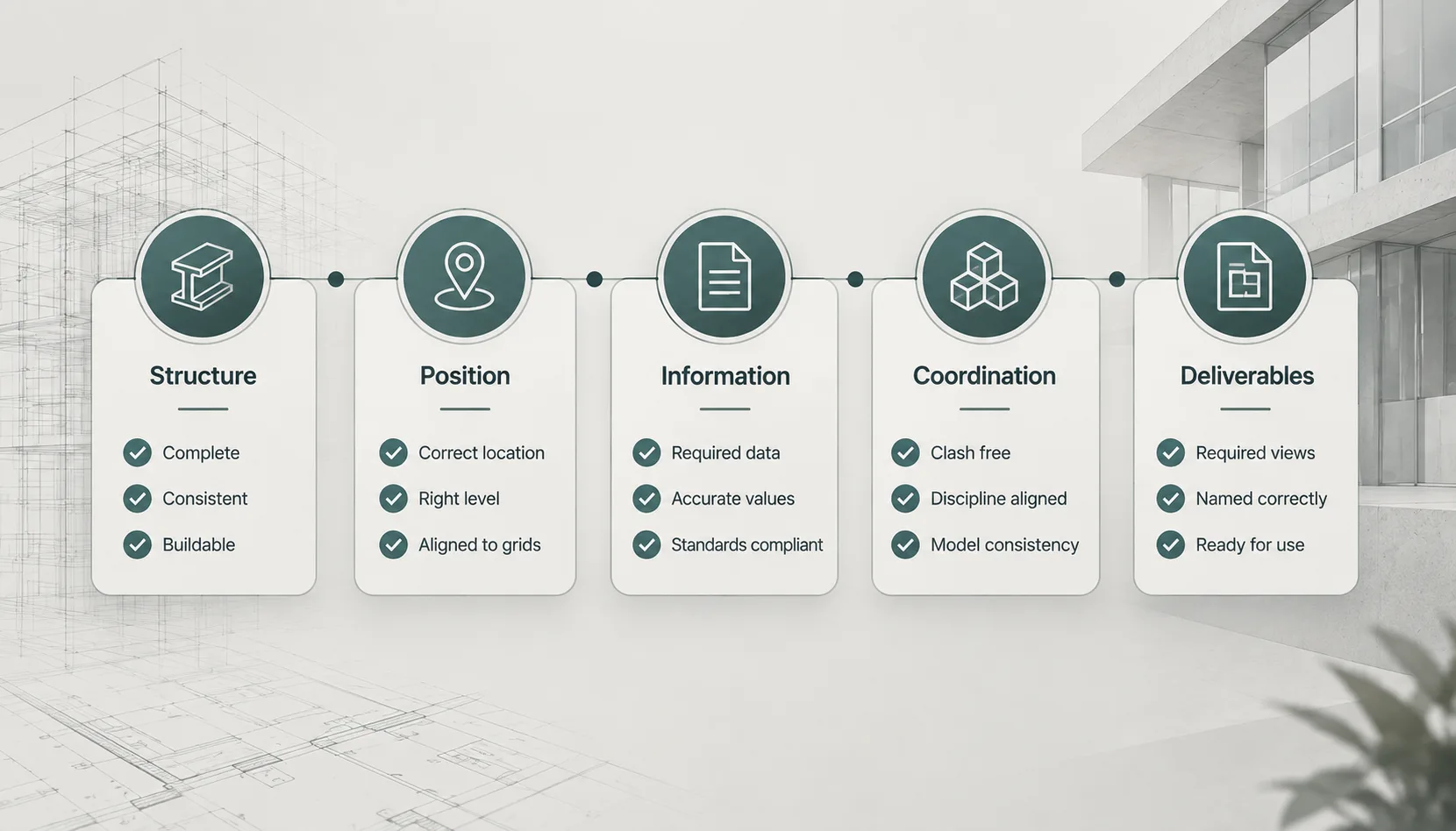
The 30-Second Test
So, if you only had half a minute, your quick review could be:
| Check | Ask Yourself |
|---|---|
| Structure | Can I understand how the model is organised? |
| Position | Are levels, grids and coordinates reliable? |
| Information | Does the model contain the required data? |
| Coordination | Can other disciplines work with it? |
| Deliverables | Can I trust what the model produces? |
You don't need to inspect everything to identify potential warning signs.
You just need to know where to look first.
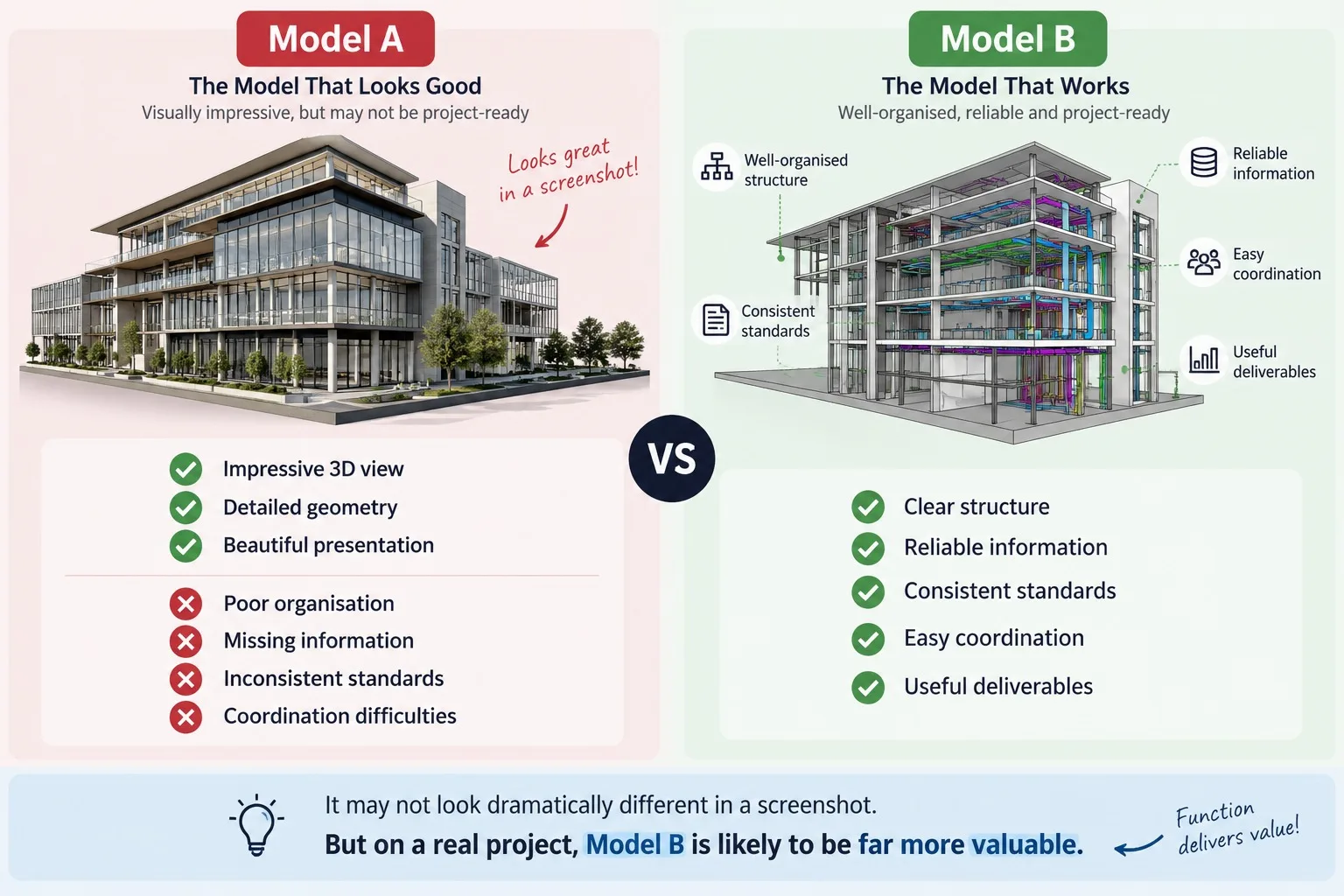
The Model That Looks Good vs The Model That Works
This is where many beginners get caught.
What Experienced BIM Professionals Notice First
They don't necessarily ask:
“How detailed is this model?”
They ask:
“Can I trust it?”
Trust comes from many things working together:
- Correct structure
- Reliable information
- Consistent standards
- Coordination
- Usable deliverables
That's what BIM model quality is really about.
A Quick Test for Your Own Model
Next time you finish a model, don't immediately congratulate yourself because the 3D view looks good.
Ask five questions:
1. Can someone else understand my model?
2. Is the project information reliable?
3. Can another discipline coordinate with it?
4. Does it follow the project's requirements?
5. Can I trust the information coming out of it?
If you can't confidently answer all five, the model may need more work.
And that's perfectly normal.
Model quality is developed through review, experience and better workflows—not just faster modelling.
Final Thought
A BIM model doesn't become professional because it contains thousands of elements.
And it doesn't become valuable because it looks impressive in a render.
A good BIM model is one that people can understand, coordinate, use and trust.
So the next time you open a BIM model, give yourself 30 seconds.
Don't ask:
“Does this look good?”
Ask:
“Would I trust this model on a real project?”
That question can tell you far more.
Frequently Asked Questions
What is BIM model quality?
BIM model quality refers to how accurately, consistently and reliably a model meets the project's requirements for geometry, information, coordination, documentation and intended use.
How do you review a BIM model?
A BIM model review can include checking its organisation, levels, grids, coordinates, information, standards, linked models, coordination and required deliverables.
Is a detailed Revit model always a good BIM model?
No. A highly detailed model can still have poor organisation, incorrect information, coordination problems or non-compliance with project requirements.
What should I check first in a BIM model?
Start with the fundamentals: model structure, levels, grids, coordinates, links, naming, required information and project-specific standards.
Why is BIM QA/QC important?
BIM QA/QC helps identify issues before information is used for coordination, documentation, construction or other project deliverables.
Professional BIM Course
Master BIM Course
Structural Design Concepts and BIM
Certified MEPF BIM Master Course
Electrical BIM Professional Program
RenderLab – Master 3D Modeling & Photorealistic Rendering
Multi-Tool Mastery for Architects & Engineers
BIM Coordinator Workflow Program
BIM FastTrack – 30 Day Intensive Training
Global Architectural & Structural BIM Project Program