Author: Devika R
August 10, 2026
8 min read
Construction Is Finished. So What Happens to the BIM Model?
The building is complete.
The contractors have finished their work. The drawings have been approved. The project team is preparing to hand over the building to its owner.
So what happens to the BIM model?
For many students, this is where the BIM story seems to end:
- Design
- BIM Modeling
- Coordination
- Construction
- Handover
But professional BIM workflows don't necessarily stop there.
The information created during design and construction can continue supporting the building through:
- Handover
- Operations
- Maintenance
- Asset Management
- Renovation
- Future Projects
This is where BIM for facility management becomes important.
BIM is not simply about creating a digital model of a building. Its value increases when the right information remains useful throughout the building lifecycle.
1. What Is BIM Handover?
BIM handover is the process of transferring relevant project information from the design and construction teams to the owner or facility management team.
But handing over a model alone isn't enough.
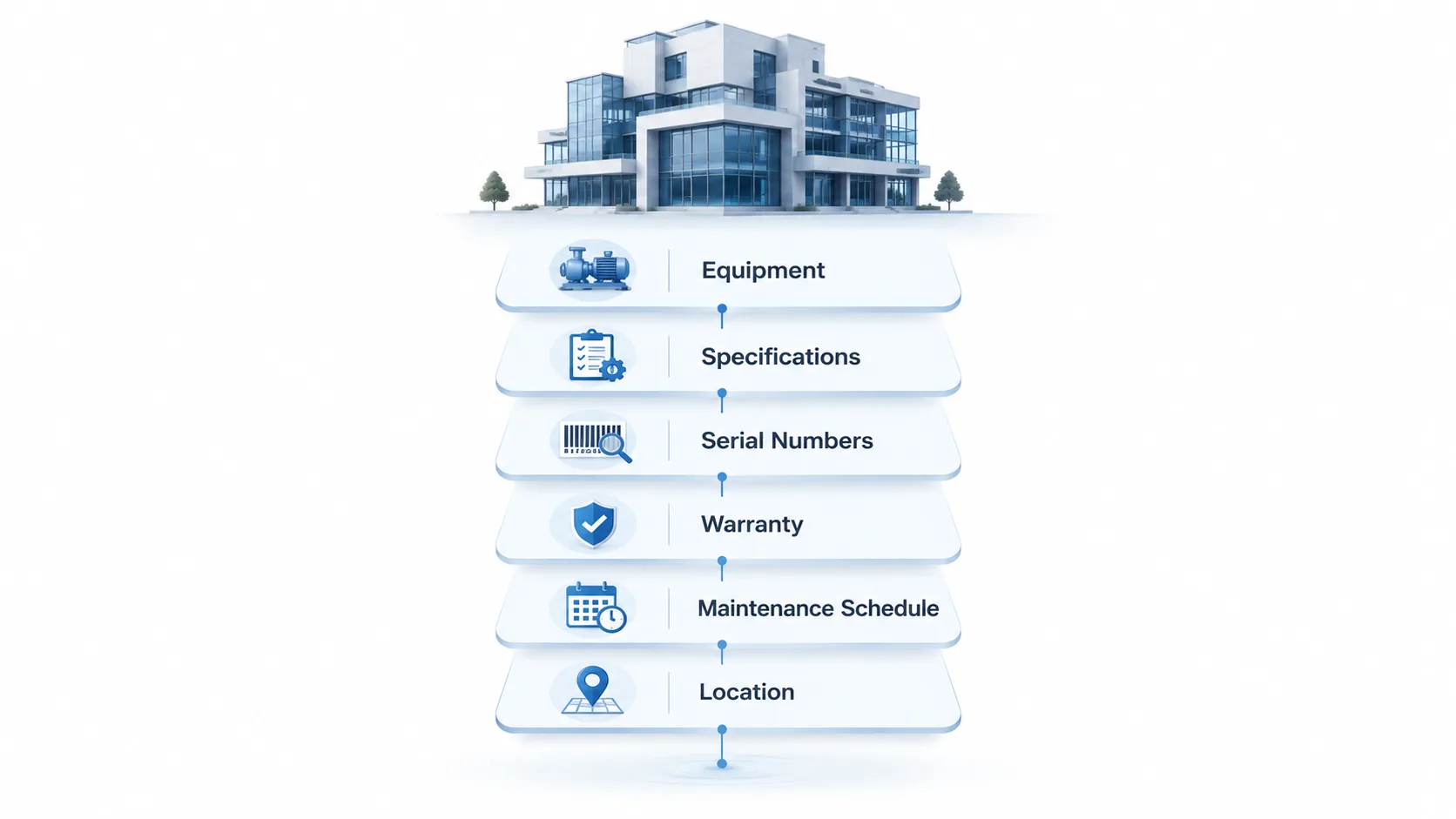
The facility team may need information about:
- Equipment
- Manufacturers
- Product specifications
- Serial numbers
- Installation details
- Warranty information
- Maintenance requirements
- Spaces and locations
- Operation and maintenance documents
The objective is simple:
Give the people operating the building the information they actually need.
COBie, for example, is designed to support the digital exchange of information about maintainable assets at handover and during the transition into operations.
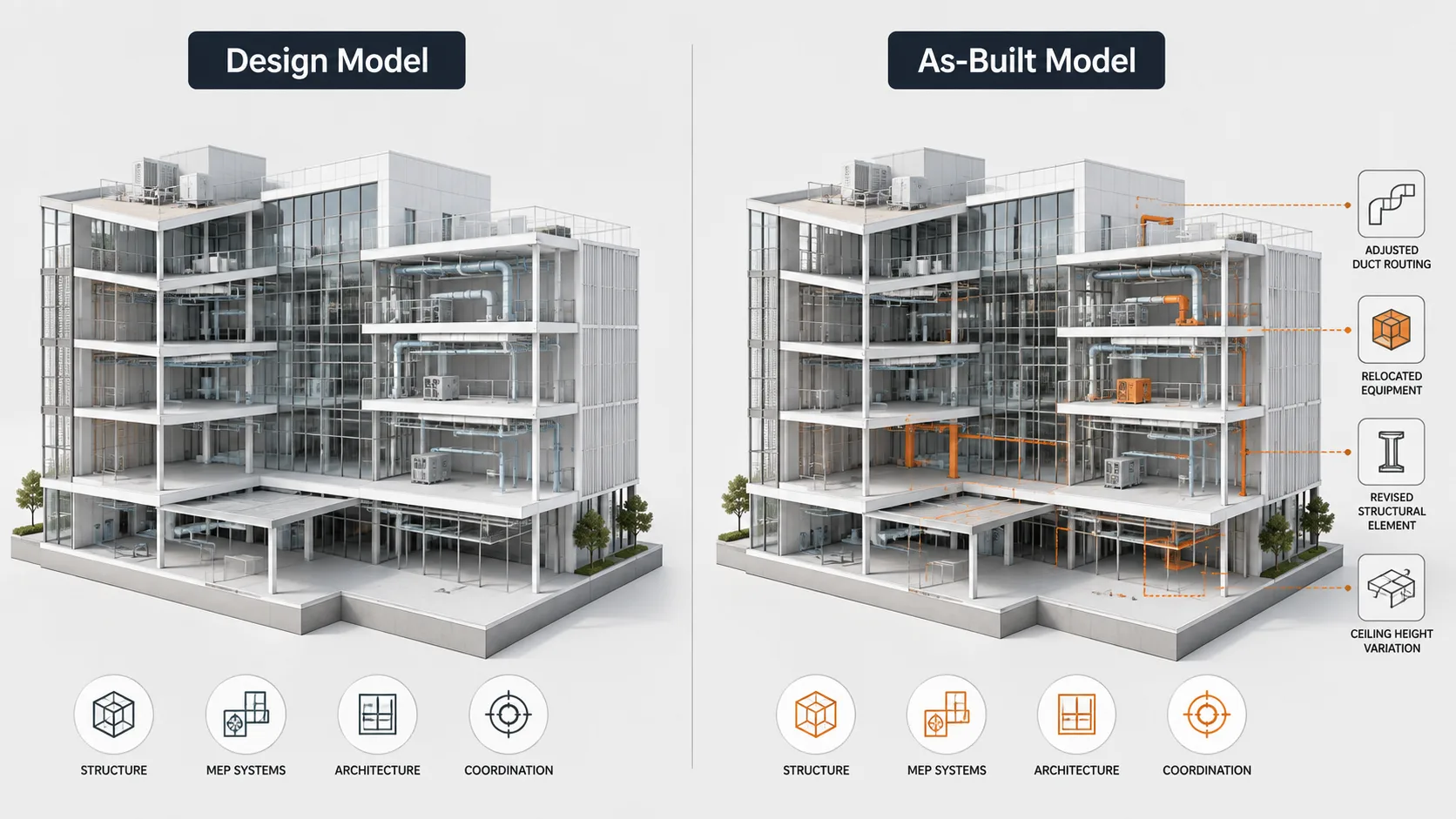
2. The As-Built BIM Model: What Was Actually Constructed?
The design model represents what was intended to be built.
The as-built BIM model aims to represent what was actually constructed.
That distinction matters.
During construction, changes can occur because of:
- Site conditions
- Approved design changes
- Material substitutions
- Equipment changes
- Coordination decisions
- Construction constraints
If these changes are not reflected in the final information, the owner may receive documentation that no longer accurately represents the building.
A useful handover therefore needs to consider both geometry and information.
3. What Information Does the Facility Team Need?
Imagine a facility manager needs to locate an air-handling unit.
A useful digital information environment could help answer:
Where is it? What equipment is it? Who manufactured it? When was it installed? What documentation belongs to it? When does it require maintenance?
This is where BIM becomes more than a 3D visualization tool.
The model can provide a context for structured asset information that supports operation and maintenance.
Autodesk describes BIM for facility management as a way to use building information to improve operational efficiency and support building performance.
4. Where Does COBie Fit?
You may have heard the term COBie in BIM job descriptions or project requirements.
COBie stands for Construction Operations Building information exchange.
Rather than thinking of COBie as another 3D model, think of it as a structured way of delivering relevant asset information for operations and maintenance.
It can contain information relating to:
- Facilities
- Floors
- Spaces
- Equipment
- Systems
- Maintenance schedules
- Documents
- Attributes
The important idea is not memorising every COBie field.
It's understanding why the information is being collected in the first place.
COBie is intended to help reduce the gap between construction handover and the start of facility operations.
5. BIM Doesn't End at Handover
Once a building becomes operational, information can continue to change.
Equipment may be:
- Replaced
- Upgraded
- Relocated
- Repaired
- Retrofitted
Spaces can also change as organisations grow or building requirements evolve.
This means the information environment needs to remain useful rather than becoming a snapshot that is forgotten immediately after handover.
That is why lifecycle thinking matters.
6. BIM for Facility Management
Consider a hospital.
A facility team may need to manage hundreds or thousands of maintainable assets:
HVAC equipment Pumps Electrical equipment Fire protection systems Medical systems Lighting Plumbing equipment
Finding the right information quickly can make maintenance work more efficient.
Instead of searching through folders of disconnected documents, structured building information can help connect an asset with its location, specifications, documentation, and maintenance information.
This is one of the major opportunities for BIM in facility management.
7. From BIM Model to Digital Twin
This is where the conversation becomes even more interesting.
A BIM model primarily represents building information.
A digital twin can go further by connecting a digital representation with information about the asset's actual operation and performance.
For example, an operational digital environment could connect building information with:
- Energy data
- Equipment performance
- Operational information
- Maintenance activities
- Building management systems
Autodesk describes digital twins as digital representations that can support building operations and performance insights after handover.
So the progression can be thought of as:
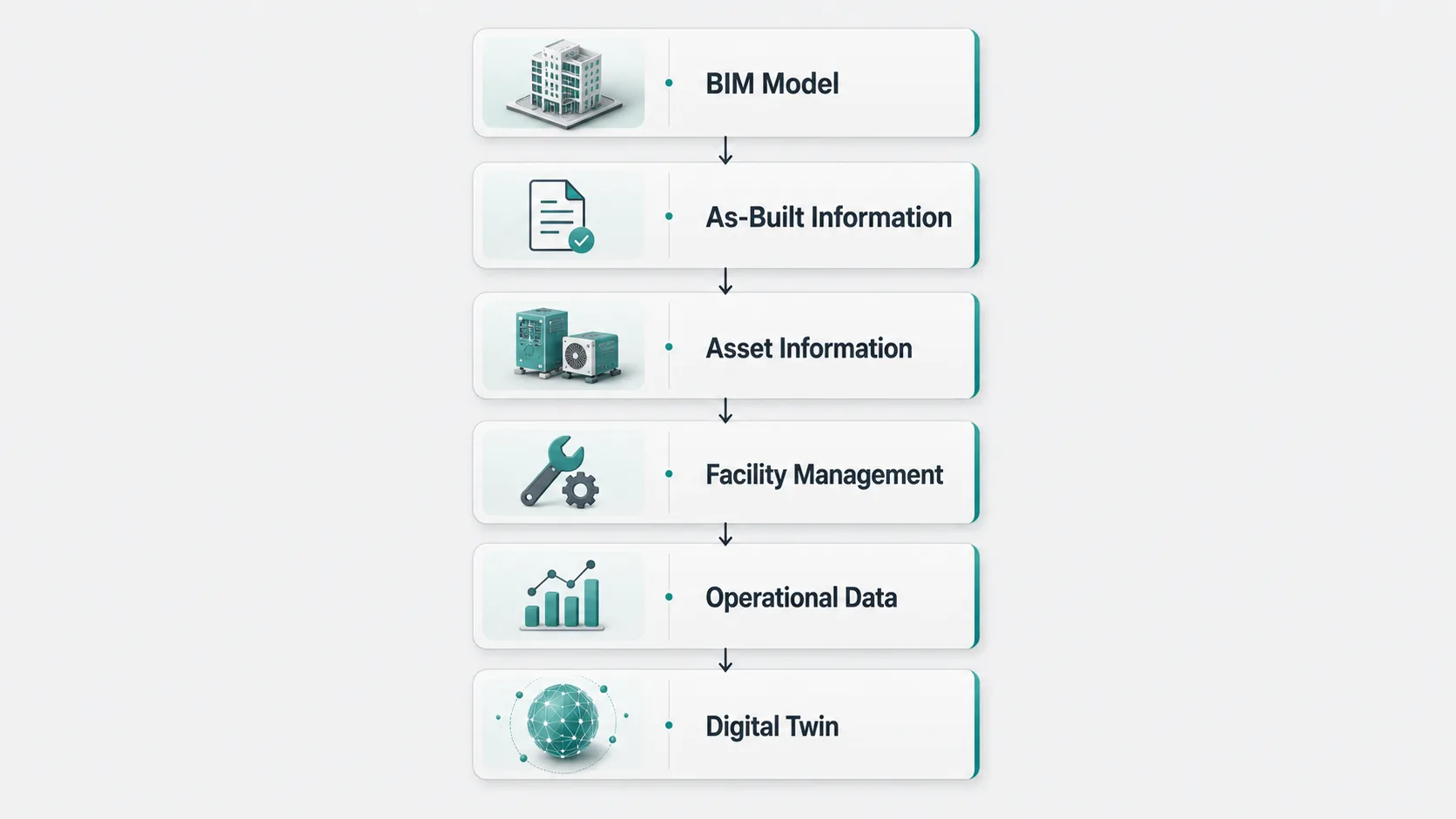
Not every project will follow this complete pathway, but it shows how BIM can extend beyond construction.
8. What Happens When the Building Changes Five Years Later?
Here's where lifecycle BIM becomes particularly valuable.
Imagine an office building completed in 2026.
Five years later:
An HVAC system needs replacement.
Without reliable information, the facility team may need to search through old drawings, manuals, spreadsheets, and maintenance records.
With well-managed asset information, they may be able to identify:
- Equipment
- Location
- Specifications
- Documents
- Maintenance Information
The building has changed, but its information can continue evolving with it.
That is the real value of thinking beyond handover.
A simplified lifecycle looks like this:
- PLANNING
- DESIGN
- BIM DEVELOPMENT
- COORDINATION
- CONSTRUCTION
- AS-BUILT INFORMATION
- HANDOVER
- FACILITY MANAGEMENT
- OPERATION & MAINTENANCE
- RENOVATION / UPGRADES
The model doesn't necessarily end when construction ends. Its information can become part of the building's operational story.
6D and 7D BIM: Where Do They Fit?
You may come across terms such as 6D BIM and 7D BIM in training programs and industry discussions.
These labels are not used identically across every organisation, so they should not be treated as a universal fixed classification.
Broadly, they are often associated with lifecycle considerations such as:
| Dimension | Common industry association |
|---|---|
| 3D | Geometry and model development |
| 4D | Time and construction sequencing |
| 5D | Cost and quantity information |
| 6D | Sustainability, performance, or lifecycle information |
| 7D | Facility management and operations |
The exact definition can vary by framework and project.
The more important lesson is that BIM can extend beyond geometry into time, cost, performance, asset information, and operations.
Why This Matters for Future BIM Professionals
If you're learning Revit today, it can be tempting to think your BIM career ends with modelling.
It doesn't have to.
The industry increasingly needs professionals who understand information across the project lifecycle, including:
- Model development
- Coordination
- Documentation
- Information management
- Handover requirements
- Asset information
- Facility management workflows
- Digital delivery
You don't necessarily need to become a facility manager.
But understanding what happens to your information after you hand it over can make you a better BIM professional.
The Real Question Isn't “Does the Model Continue?”
It's:
Does the information remain useful?
A beautiful model that becomes outdated immediately after handover has limited long-term value.
A well-structured information environment can continue supporting owners, operators, maintenance teams, and future project teams long after construction is complete.
That is the difference between thinking of BIM as modelling and as lifecycle information management.
Final Thoughts
Construction may have an end date.
The building doesn't.
Once a project is handed over, the building enters another stage—operation, maintenance, upgrades, and eventually renovation or redevelopment.
That is why BIM handover, asset information, facility management, and digital twins are becoming increasingly important parts of the wider digital construction conversation.
For BIM students and professionals, the lesson is straightforward:
Don't only learn how to create the model. Learn what information the model needs to deliver, who will use it, and what happens after you hand it over.
Because the best BIM deliverable isn't simply a model that looks complete.
It's information that remains useful even after the construction team has left.
Frequently Asked Questions
What is BIM handover?
BIM handover is the process of transferring relevant project and asset information from the design and construction teams to the owner or facility management team for building operations.
What is an as-built BIM model?
An as-built BIM model represents the building as it was actually constructed, including relevant approved changes made during construction.
What is BIM used for in facility management?
BIM can help facility teams access and manage information about building spaces, equipment, systems, documentation, maintenance, and assets.
What is COBie in BIM?
COBie is a structured information exchange approach used to capture and deliver information about maintainable building assets for operations and maintenance.
Is BIM the same as a digital twin?
No. BIM provides structured information about a built asset, while a digital twin can connect a digital representation with operational or real-world data to support ongoing monitoring and decision-making.
Do BIM professionals need to learn facility management?
Not necessarily. However, understanding handover requirements, asset information, and how BIM data is used during operations can strengthen a BIM professional's understanding of the complete project lifecycle
Professional BIM Course
Master BIM Course
Structural Design Concepts and BIM
Certified MEPF BIM Master Course
Electrical BIM Professional Program
RenderLab – Master 3D Modeling & Photorealistic Rendering
Multi-Tool Mastery for Architects & Engineers
BIM Coordinator Workflow Program
BIM FastTrack – 30 Day Intensive Training
Global Architectural & Structural BIM Project Program